PDF Settings
The PDF Settings window lets you choose how exported PDF files will appear, including page orientation, paper size, scaling, margins, and background graphics. These settings apply only when exporting via File → Export → PDF.
Your selected settings are saved automatically and will be used as the default for future PDF exports.
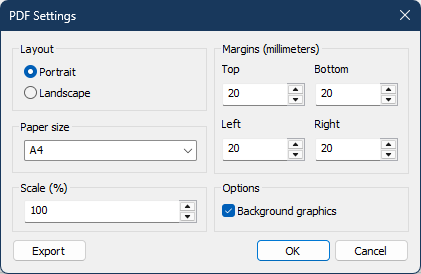
Figure 238. PDF Settings window
Available Options
- Layout — Choose portrait or landscape orientation.
- Paper Size — Select the paper size to use for the exported PDF (for example, A4 or Letter).
- Scale — Adjusts the overall size of the exported page content. All elements (text, images, and layout) scale proportionally.
- Margins — Set custom page margins.
- Background Graphics — Include or exclude background colours and images in the exported PDF.
Clicking Export creates the PDF using the current settings, just as selecting File → Export → PDF does.
ℹ️ Note: These settings affect PDF exports only. They are not used when printing, which uses your printer's own settings and print preview.
Navigation
- Parent topic: Common Features
- Previous topic: Exporting Schedules
- Next topic: Preview in Browser