
Importing Data from NWS Desktop
⚠️ Backup Reminder
Please perform a complete backup before undertaking the steps below — this operation cannot be undone.
In the Publishers Database window, select NWS Desktop from the Import fly‑out menu on the Database menu.
This tool allows you to import publishers from an NWS Desktop CSV export into your current MSA database.
How to Use
1. Select the NWS CSV file
Click the folder icon and choose your NWS Desktop Publishers CSV file.
- The file must be UTF‑8 encoded
- The file must include column headers
2. Choose whether to reset your database
Before importing, MSA will prompt:
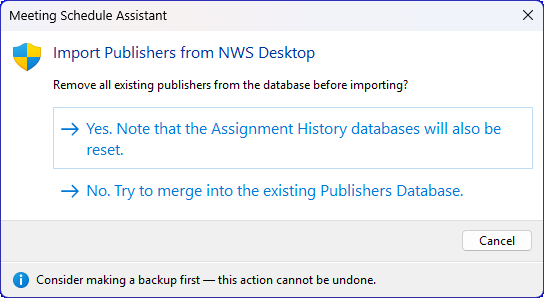
Figure 8: Import Publishers from NWS Desktop — confirmation dialog prompting whether to reset or merge the Publishers Database before importing.
This dialog asks:
“Remove all existing publishers from the database before importing?”
Options:
- Yes — Clears all publishers and field service groups, resets the Assignment History databases, refreshes the listbox, and then imports fresh from the CSV.
- No — Merges the new data into the existing Publishers Database.
- Cancel — Aborts the import entirely.
3. Start the Import
MSA will:
- Create new publishers
- Create new groups if needed
- Apply privilege and pioneer status
- Apply supported assignment flags
- Save the database
- Display a detailed log with a summary
CSV Import Guide — What’s Supported
Field Mappings
Name Fields
MSA determines the publisher’s name using:
- DisplayName
- If empty → FirstName + LastName
- If still empty → row is skipped
Gender
Based on the Gender column:
- Female → Female
- Anything else (including blank) → Male
GroupName
- New groups are created automatically
- Existing groups are reused
- After import, the group list is refreshed if new groups were added
GroupResponsibility
Supported values:
- Overseer → Group Overseer
- Assistant → Group Assistant
Anything else is ignored.
Privilege → Appointed / Serving
The Privilege column controls both AppointedAs and baseline ServingAs.
|
Privilege |
Meaning |
AppointedAs |
ServingAs |
|
E |
Elder |
Elder |
Publisher |
|
MS |
Ministerial Servant |
MS |
Publisher |
|
PUB |
Publisher |
Not Appointed |
Publisher |
|
UBP |
Unbaptised Publisher |
Not Appointed |
Unbaptised Publisher |
|
No or blank |
None |
Not Appointed |
Other |
PioneerStatus → ServingAs Override
Only applied when Privilege ≠ UBP.
|
PioneerStatus |
ServingAs |
|
RegularPioneer |
Regular Pioneer |
|
AuxiliaryPioneer |
Publisher |
|
Publisher |
Publisher |
|
blank / other |
no change |
Notes
The Notes column is imported directly into the publisher’s Notes field.
Assignment Flags (UseFor…)
Only the following NWS Desktop fields are supported:
|
CSV Column |
MSA Assignment |
|
UseForChairman |
Chairman |
|
UseForAuxiliaryCounselor |
Auxiliary Class Counsellor |
|
UseForPrayers |
Prayer |
|
UseForTreasuresTalk |
OCLM Treasures |
|
UseForTreasuresGems |
OCLM Gems |
|
UseForTreasuresBR |
Student Bible Reading |
|
UseForApplyIC |
Student Discussion |
|
UseForApplyRV |
Student Discussion |
|
UseForApplyBS |
Student Discussion |
|
UseForApplyExplaining |
Student Discussion |
|
UseForApplyStudentTalk |
Student Talk |
|
UseForApplyAssistant |
Assistant |
|
UseForLivingParts |
OCLM Living |
|
UseForCBS |
CBS Conductor |
|
UseForCBSReader |
CBS Reader |
Unsupported assignment fields are ignored.
Unsupported Fields
The following NWS Desktop fields are not imported:
- Address
- Phone numbers
- Emergency contacts
- DOB
- Spiritual status fields not represented in MSA
- Public witnessing fields
- Duty / Maintenance / Cleaning / Garden fields
- Custom fields
- Any UseFor… fields not listed above
Limitations
- Partial imports are not supported — the entire CSV is processed
- Duplicate publishers are skipped (existing records are not updated)
- Group name clashes are not resolved
- Invalid or unexpected values may be silently ignored
- Only the fields listed above are imported
Import Log & Summary
After the import completes, MSA displays a log dialog showing:
- Each added publisher
- Each skipped duplicate
- Any errors
- A final summary: