Tools Menu
The Tools menu provides quick access to built‑in features and companion applications that can be used alongside Meeting Schedule Assistant. Items at the top of the menu are part of MSA itself, while the remaining entries launch optional external tools.
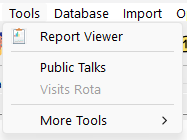
Report Viewer
Opens the Report Viewer, a built‑in tool for reviewing congregation, publisher, and public talk, and meeting attendance information in a tabbed interface.
The viewer allows you to inspect data without opening the individual database managers.
Public Talks
Launches an installed copy of Public Talks (if available).
Public Talks assists with preparing and maintaining weekend meeting talk schedules.
Meeting Schedule Assistant can read the Public Talks database to import information, providing partial integration between the applications.
Public Talks version 20.0.3 or higher is required for this feature.
Learn more about Public Talks.
Visits Rota
Launches an installed copy of Visits Rota (if available).
Visits Rota helps prepare schedules for visiting the elderly and infirm and shepherding arrangements.
This application does not integrate with Meeting Schedule Assistant; the Tools menu simply provides a convenient way to launch it.
Visits Rota version 19.0.0 or higher is required for this feature.
Learn more about Visits Rota.
More Tools
Provides access to additional utilities that may be useful in congregation settings.
Center Cursor on Screen
Launches the Center Cursor on Screen utility.
This utility helps Kingdom Hall audio-visual teams locate the mouse pointer when working with multiple monitors. It operates independently from Meeting Schedule Assistant.
Learn more about Center Cursor on Screen.
Related Topics
Navigation
- Parent topic: Menu Bar
- Previous topic: File Menu
- Next topic: Database Menu