🌟 Welcome to the Latest Meeting Schedule Assistant Update
This new release brings a thoughtful collection of improvements designed to make your daily workflow smoother and more enjoyable. You’ll find enhanced filtering tools in the Public Talks Manager, a much easier way to submit public talk updates in bulk, and a refreshed Social Icons panel that now links directly to our growing Google Group community. We’ve also included important behind‑the‑scenes upgrades to internal components to keep the software running reliably, along with updated Arabic and Gujarati content.
Looking ahead, this will likely be the final release of Meeting Schedule Assistant that is digitally signed. My current code‑signing certificate expires on 16 March, and renewing it has unfortunately become too costly to justify at this time. Development will continue as normal, with new features and improvements still planned, but you may notice more security prompts during installation as Windows will now flag the software as coming from an “unknown publisher.” Nothing else is changing behind the scenes—this is simply a heads‑up so you know what to expect and aren’t caught off guard.
📮 Smoother Public Talk Updates with New Bulk Submission
Submitting outline updates is now far more convenient. The latest improvements let you gather all your changes into a single, tidy submission instead of sending multiple individual emails. This makes the whole process quicker for you and easier for the recipient to manage.

🌼 What’s Improved?
- Bulk submission support — You can now select multiple updated outlines and send them together in one email. No more repeating the same steps for each talk.
- Automatic packaging — Once you’ve chosen the outlines to include, the software builds a single, well‑formatted email containing all the relevant information.
- Fewer interruptions — Because everything is bundled, you only need to send one message, reducing back‑and‑forth and keeping your inbox cleaner.
🌟 Why This Matters
This enhancement is especially helpful if you maintain your congregation’s talk database regularly. Instead of stopping to send updates one at a time, you can now submit them all together when you’re ready. It’s a small change that adds up to a noticeably smoother workflow.
📘 Learn More
Full details, including screenshots and step‑by‑step guidance, are available here:
Public Talks Manager – Submitting Public Talk Updates
https://www.publictalksoftware.co.uk/help-msa/msa-talkdb-manage-public-talks.html#TALK_UPDATES
✨ Discover the New Filtering Tools in Public Talks Manager
Managing your congregation’s public talk outlines just became smoother, faster, and far more intuitive. The latest update introduces a redesigned set of powerful filtering tools in the Public Talks Manager window, giving you clearer insight and quicker access to exactly the information you need.
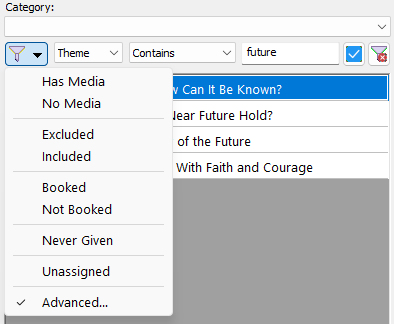
🌿 What’s New?
- Quick filter toggles — The handy menu options let you instantly show or hide common categories with a single click.
- Advanced Filtering panel — Build more precise, multi‑step filters using outline numbers, themes, assignment history, and more. When you’re ready, press the Apply (✓) button to update the results.
- A cleaner, more organised layout — Everything is easier to read and understand at a glance, helping you focus on the information that matters.
- Smarter operator choices — Compact, readable operator labels make it simple to create the exact filter you need.
📘 Learn More
You can explore the full guide, complete with screenshots and examples, right here:
Public Talks Manager – Filtering Tools
https://www.publictalksoftware.co.uk/help-msa/msa-talkdb-manage-pt-filters.html
🌐 A New Home for Community Support and Feedback
The Social Icons panel on the main window has been refreshed to make it easier for users to stay connected and share ideas. Alongside the existing links, you’ll now find a dedicated icon for our new Google Group, created especially for Meeting Schedule Assistant users who want to exchange tips, request features, report issues, or simply help one another.

💬 What’s New?
- Google Group integration — A new social icon now takes you directly to the Meeting Schedule Assistant Support Group:
https://groups.google.com/d/forum/meeting-schedule-assistant-support
This space is open to everyone and designed to encourage friendly, constructive discussion. - Centralised community hub — Instead of scattering feedback across different channels, the Google Group brings everything together in one place, making it easier to follow conversations and stay updated.
- Supportive environment — Users can ask questions, share solutions, and collaborate with others who use the software day‑to‑day.
🙏 A Thank‑You to Early Members
A warm thank‑you to everyone who has already joined the group and contributed.
📘 Learn More
You can find details about the Social Icons panel and how to use it here:
https://www.publictalksoftware.co.uk/help-msa/msa.html#SOCIAL_ICON_NEWS_FEED
🗳️ Thank You for Supporting the New MSA Feedback Poll
A heartfelt thank‑you to everyone who has already taken the time to respond to the new Meeting Schedule Assistant survey.
🌱 Why Your Participation Matters
- Each response highlights what users appreciate and what could be refined.
- Trends in the feedback help prioritise upcoming development work.
- Suggestions often spark new ideas or reveal opportunities that might otherwise be missed.
- The more voices involved, the clearer the picture becomes for future planning.
📣 Still Time to Get Involved
If you haven’t had a chance yet, the survey is still open and only takes a few moments to complete. We’re grateful for every contribution, and we encourage as many users as possible to share their thoughts.
You can take part here:
https://www.publictalksoftware.co.uk/2026/02/survey-about-msa/
Your input genuinely makes a difference, and it’s appreciated more than you know.
A gentle closing note works best when it feels appreciative rather than promotional, and when it sits quietly at the bottom of the newsletter without drawing too much attention. Here’s a subtle, warm paragraph you can use:
If you enjoy using Meeting Schedule Assistant and would like to support its ongoing development, there’s an option to make a small voluntary contribution here: https://buymeacoffee.com/publictalksoftware. It’s never expected, but always appreciated.
Latest Download
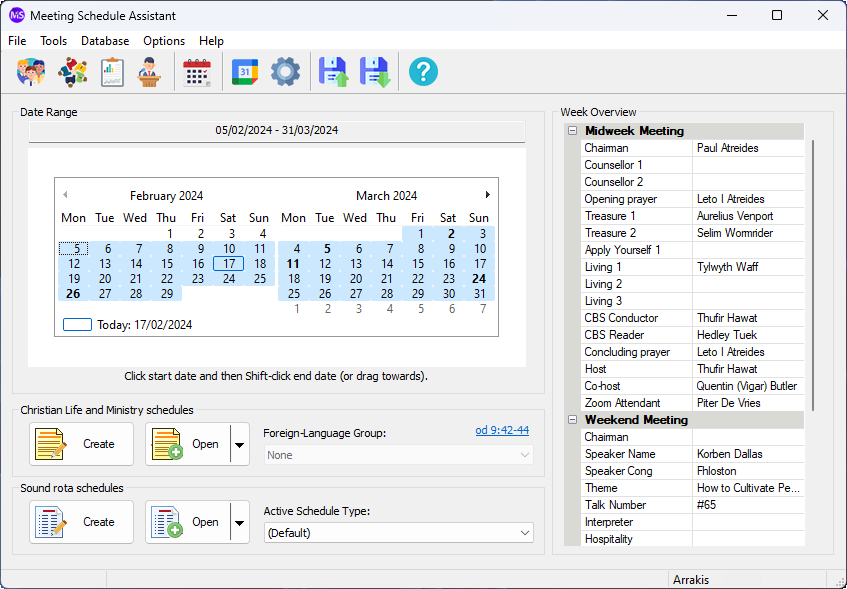
Supported Operating Systems
- Windows 10
- Windows 11
Deprecated Operating Systems
These operating systems are no longer supported:
- Windows 7 (Service Pack 1)
- Windows 8.1
You can still download the last supported version of Meeting Schedule Assistant (which was 23.1.0) from here. But this version is no longer maintained. You are encouraged to use version 23.1.1 or higher.
Supported Operating Systems
- Windows 10
- Windows 11
Deprecated Operating Systems
These operating systems are no longer supported:
- Windows 7 (Service Pack 1)
- Windows 8.1
You can still download the last supported version of Meeting Schedule Assistant (which was 23.1.0) from here. But this version is no longer maintained. You are encouraged to use version 23.1.1 or higher.
Setup the software to update automatically or upgrade by using the Check for Update feature from the Help menu.